
Install Pelican Panel & Wings
Full procedure: required, installation Panel/Wings, node, phpMyAdmin, MariaDB and first game servers.
Ready to start your service? Check offers and order online.
View offers and orderObjective
Install Pelican Panel and Wings on a Linux VPS (Debian / Ubuntu), then configure a node, phpMyAdmin and MariaDB in a clean and secure manner.
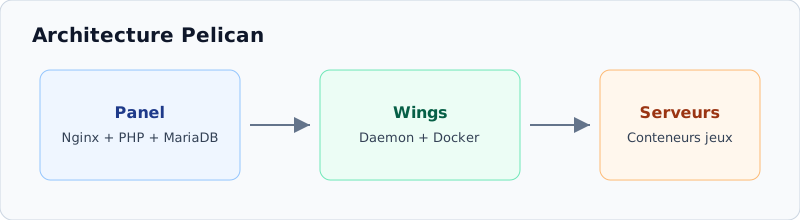
Pelican is the open-source evolution of the Pterodactyl ecosystem: the Panel manages the web interface, Wings launches the Docker containers from the game servers.
Prerequisite
- VPS Anthony IT Solutions (Debian 11/12/13 or Ubuntu 22.04/24.04)
- Access root to SSH (first SSH connection)
- Recommended minimum: 2 vCPU / 4 GB RAM / 40GB disk (more if Panel + Wings on the same machine)
- A domain (e.g.
panel.votredomaine.fr) in registration A to the IP of the VPS - Ports: 22, 80/443, 2022 (Wings / SFTP), + game ports (25565, 30120...)
- Recommended Virtualization KVM (Docker does not work on OpenVZ / LXC)
1. Preparing the system
Log in as a root, update and restart:
apt update
apt full-upgrade -y
apt install -y bash curl wget sudo unzip nano ca-certificates gnupg
reboot
Reconnect after reboot and check the OS:
cat /etc/os-release
hostnamectl
systemd-detect-virt2. Install Panel and Wings
Launch the interactive installer (community, modeled on the Pterodactyl installer):
bash <(curl -Ss https://raw.githubusercontent.com/Zinidia/Pelinstaller/Production/install.sh)- Installation option
First install Panel, then Wings on the same machine (ideal for a single VPS), or both at once.
- FQDN domain
Ex.
panel.votredomaine.fr- the DNS A must already point to the VPS. - E-mail & SSL
Enter a valid e-mail and accept Lets Encrypt when the script offers it.
- Database
Note the MariaDB password / Panel user displayed by the script.
- Web Installer
Finish the configuration on
https://panel.votredomaine.fr/installerIf the script redirects you to it. - Admin account
Create admin Panel (e-mail, username, strong password) via web installer or CLI prompts.
Check the services:
systemctl status nginx
systemctl status mariadb
systemctl status wings
systemctl status docker
Open https://panel.votredomaine.fr and log in with the created admin account.
3. Configure Node
- Rental
Admin → Rentals → Create (ex.
France/FR-01). - Node
Admin → Nodes → Create :
- Name :
node-01 - FQDN : same domain or
node.votredomaine.fr - Memory / Disk: leave a margin for the system
- Daemon Port : port displayed by the Panel (often
2022or according to your config) - SFTP Port :
2022default on Pelican
- Name :
- Allowances
Add public IP + a port range (e.g.
25565-25600,30120). - Config Wings
Open the node → tab Configuration → Copy the displayed YAML, or use the button Auto Deploy.
Paste the config on the VPS:
sudo nano /etc/pelican/config.ymlThen restart Wings:
systemctl restart wings
systemctl status wings
Test debug (optional) before switching to systemd service:
sudo wings --debugwings after each change. If the Panel is HTTPS, Wings should also use SSL.4. Open ports (UFW)
ufw allow 22/tcp
ufw allow 80/tcp
ufw allow 443/tcp
ufw allow 2022/tcp
ufw allow 25565:25600/tcp
ufw allow 30120/tcp
ufw allow 30120/udp
ufw enable
ufw status
5. Install phpMyAdmin (optional)
cd /var/www/pelican/public
mkdir -p phpmyadmin && cd phpmyadmin
wget https://files.phpmyadmin.net/phpMyAdmin/5.2.1/phpMyAdmin-5.2.1-all-languages.zip
unzip phpMyAdmin-5.2.1-all-languages.zip
mv phpMyAdmin-5.2.1-all-languages/* .
rm -rf phpMyAdmin-5.2.1-all-languages phpMyAdmin-5.2.1-all-languages.zip
cp config.sample.inc.php config.inc.php
nano config.inc.php
Define a blowfish_secret random (32+ characters):
$cfg['blowfish_secret'] = 'REMPLACEZ_PAR_UNE_CHAINE_ALEATOIRE_32+';Access: https://panel.votredomaine.fr/phpmyadmin
6. Configure MariaDB
Recommended local listening:
sudo nano /etc/mysql/mariadb.conf.d/50-server.cnfbind-address = 127.0.0.1systemctl restart mariadbCreate users (strong passwords):
mysql -u root -pCREATE DATABASE phpmyadmin DEFAULT CHARACTER SET utf8mb4 COLLATE utf8mb4_unicode_ci;
CREATE USER 'phpmyadmin'@'localhost' IDENTIFIED BY 'MOT_DE_PASSE_FORT';
GRANT ALL PRIVILEGES ON phpmyadmin.* TO 'phpmyadmin'@'localhost';
CREATE USER 'games'@'localhost' IDENTIFIED BY 'AUTRE_MOT_DE_PASSE_FORT';
GRANT ALL PRIVILEGES ON *.* TO 'games'@'localhost' WITH GRANT OPTION;
FLUSH PRIVILEGES;
EXIT;APP_KEY file /var/www/pelican/.env Without it, the Panel's encrypted data are unrecoverable.7. Create the first game server
- Eggs
Admin → Eggs / Nests: choose l enquiry (Paper, FiveM, Palworld, etc.) - see also Pelican Hub.
- User
Admin → Users: client account (or admin to test).
- Server
Admin → Servers → Create : node, allocation, RAM/CPU/disc, egg, then Start.
- MySQL base
Create a dedicated database with the user
gamesand inform it in the server variables.
8. Verifications
- HTTPS Panel OK
- Node Connected (green heart)
systemctl is-active wings docker nginx mariadb→active- Test server starts correctly
journalctl -u wings -n 50 --no-pager
docker ps
df -h
free -h
Troubleshooting
- Offline node : token /
config.yml/ Wings port /systemctl restart wings - SSL failed: DNS A incorrect or port 80 closed
- Installation blocked : Docker, full disk, invalid egg
- MariaDB refused : user/host/password or
bind-address - Missing Docker :
curl -sSL https://get.docker.com/ | CHANNEL=stable shthen restart Wings
Related guides
- Install Pterodactyl Panel & Wings
- First SSH connection
- UFWfirewall
- Certbot SSL Certificate
- Secure MySQL
- Install Docker
- Start a game server