
Using the web hosting panel
MySQL files, databases, email accounts, aliases and quotas from the customer area.
Ready to start your service? Check offers and order online.
View offers and orderUsing the web hosting panel
This guide details the complete procedure for web hosting panel Anthony IT on your web hosting Anthony IT Solutions hosted in France. Each step is explained for reliable deployment in production.
Whether you're starting or migrating an existing environment, follow the sections in order: Prerequisites, configuration, verification and good maintenance practices for Anthony IT web hosting panel.
What you need
- Offer web hosting delivered and active
- Client space identifiers Anthony IT Solutions
- Domain pointing to hosting
- Recent browser (Chrome, Firefox, Edge)
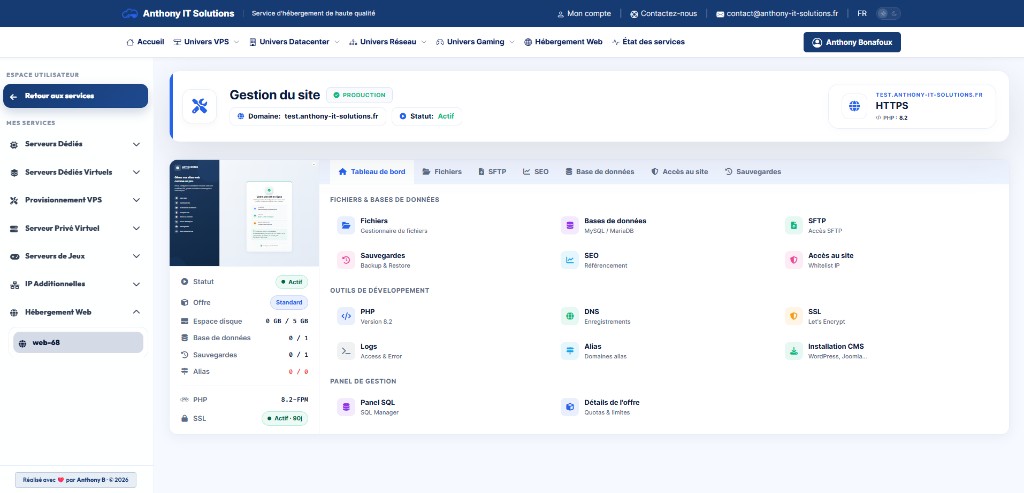
Go to the panel
-
Customer area
Log in to cloud.anthony-it-solutions.fr/client → My Services.
-
Open management
Click Manage on your web offer. The panel opens in a new tab.
-
Overview
See storage quotas, MySQL databases, mail accounts and SSL status.
File Management
-
Web browser
Browse
public_html, edit files, upload archives. -
Permissions
Change chmod to folders and files if required by an application.
-
Alternative SFTP
For large volumes, prefer SFTP with FileZilla.
Databases and MySQL
-
Create a database
Section Bases → new base, MySQLguide.
-
phpMyAdmin
Direct access, phpMyAdmin.
-
Backup
Export before update, Save.
E-mails and SSL
-
Mail accounts
Create boxes and alias, e-mails.
-
SSL
State Let's Encrypt and Renewal, SSL.
-
DNS
Recommended registrations for your domain.
Current actions
-
WordPress
Installer or manual, install WordPress.
-
Cron
Planned tasks, cron.
-
Logs
Diagnostic, consult logs.
Troubleshooting
- Panel inaccessible: check active subscription
- Full quota: free space
- SSL failed: DNS
- Denied basis: identifiers
Frequently Asked Questions
Where is the SFTP password?
SFTP Guide.
Several sites?
Multi-domains.
First site?
First site.
Support?
Customer space sticker.
Related guides
See also our web hosting offer and all the procedures on wiki web hosting.